ExpressVPN adds Web Protection to its browser extension



ExpressVPN’s browser extension now includes Web Protection, a new feature that helps block known malicious, phishing, and scam websites in real time, even when your VPN isn’t connected. It’s available at no additional cost to all Basic, Advanced, and Express Pro subscribers, as well as ExpressVPN for Teams users.
Web Protection at a glance
- Works with or without the VPN: Keep Web Protection on whether or not you’re connected to the VPN.
- Blocks known harmful sites: Stops malicious, phishing, and scam websites from loading in your browser.
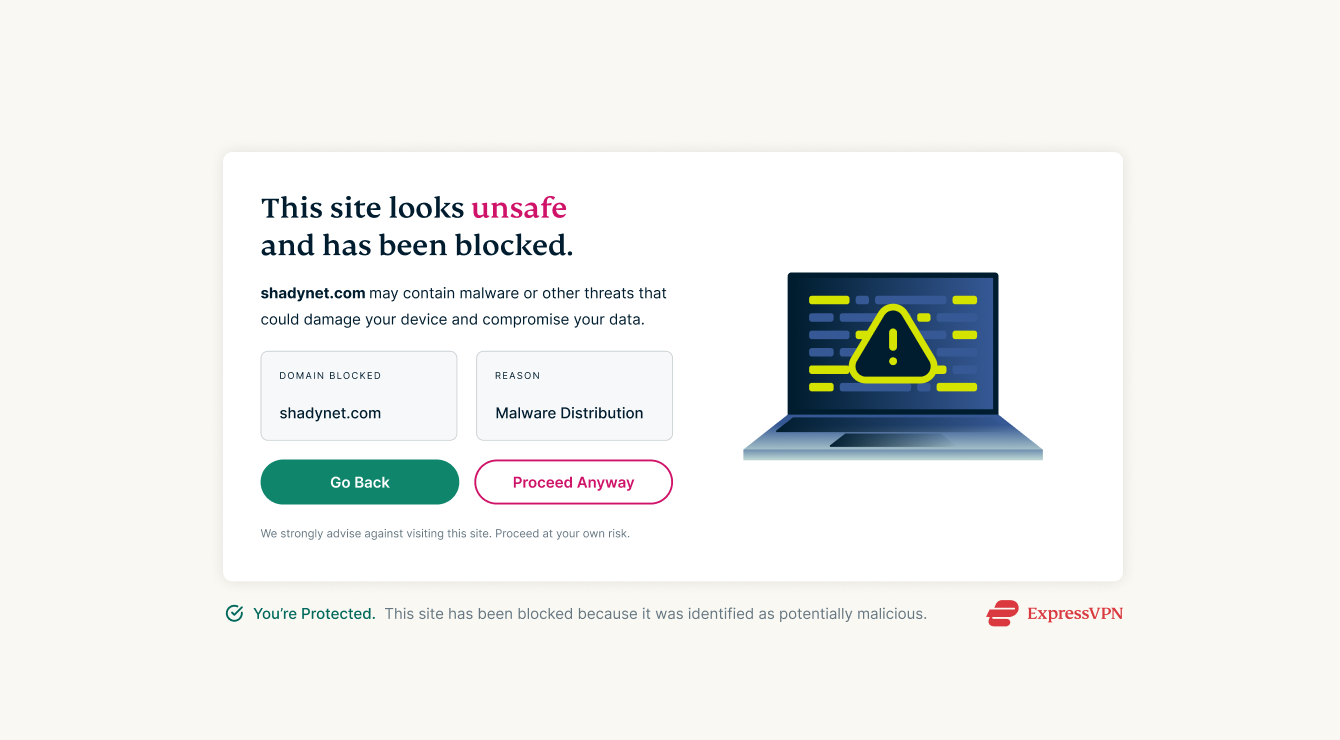
- Shows when a site is blocked: A clear block page explains when Web Protection has stepped in and why.
- Your own block and allow lists: Choose specific sites to block or allow directly in the extension.
- Available across supported browsers: Use Web Protection on Chrome, Firefox, Edge, Brave, and other Chromium-based browsers.
Why protection in the browser matters
The browser is where most people run into online threats: clicking a link, a search result, or an ad can take you to a fake login page or a scam store. These sites often look convincing, and they can appear and disappear quickly.
Web Protection adds a safety check at exactly that point. When a page starts to load, it’s checked against regularly updated lists of known malicious, phishing, and scam sites. If there’s a match, Web Protection stops the page and shows a block page instead.
More precise protection against harmful websites
Web Protection checks the full web address, rather than the whole domain. This lets it target a specific malicious page or script while leaving other content on the same domain accessible.
For example, a web address like files.example.com/shared/fake-login.html points to one specific page on a site. DNS-based tools only see the files.example.com part, so to stop that one page, they’d have to block the whole site. Web Protection sees the full address, so it can block the harmful page and leave everything else on the site accessible.
When Web Protection blocks a harmful site, you’ll see an ExpressVPN block page explaining what happened.
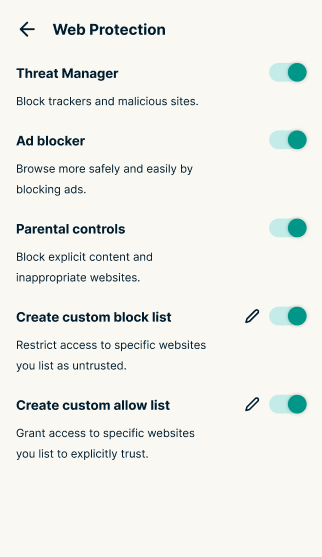
You can enable the Web Protection features you need (Threat Manager, Ad blocker, and Parental Controls) individually through the browser extension. You can also manage your own list of blocked or allowed domains directly in the browser extension. Add a site to your block list to stop it loading or to your allow list if you trust a site and never want it blocked.
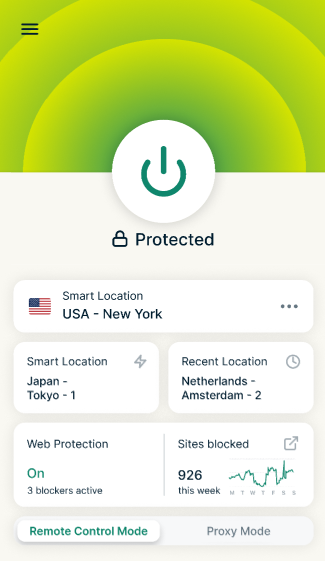
You can also see how many items Web Protection has blocked on your ExpressVPN+ account portal. The browser extension also displays a weekly count on its home screen.
How Web Protection works alongside Advanced Protection
ExpressVPN now protects you against harmful sites at two levels: on your network and in your browser.
Advanced Protection works at the network level, inside the VPN tunnel, and blocks threats across all the traffic on your device. It needs an active VPN connection, and like all DNS-based tools, it can only block entire domains.
Web Protection works inside your browser, which gives it a key advantage: it keeps working whether or not you’re connected to the VPN. It also blocks at the full URL level, not just the domain. And because it runs in the browser, Web Protection also shows you a clear block page when it stops a site and lets you manage your own block and allow lists right in the extension.
| Web Protection | Advanced Protection | |
|---|---|---|
| Where it works | In the browser | Device-wide, across all apps and traffic |
| VPN connection needed? | No, works with or without the VPN | Yes, works only while the VPN is connected |
| How it blocks | Checks the full URL, so it can do more precise blocking | DNS-based, so it can only block entire domains |
| When a site is blocked | Shows a clear block page | Blocks silently in the background |
| Custom block and allow lists | Yes, managed in the extension | No |
| Blocking stats | Yes, in your ExpressVPN+ account portal | No |
The two features complement each other. Advanced Protection covers threats across your whole device when the VPN is on. Web Protection covers threats in your browser with greater precision, at all times.
The latest addition to ExpressVPN’s hybrid browser extension
Web Protection builds on the hybrid browser extension ExpressVPN introduced earlier this year. It was the first VPN-proxy hybrid extension on the market, combining two kinds of protection in one tool:
- Proxy mode: Protects your browser traffic on its own, even without the ExpressVPN app installed.
- Remote control mode: Connects to the ExpressVPN desktop app for full-device VPN protection, controlled from your browser.
- Smart Routing: In proxy mode, it lets you set rules that send specific websites, or all sites from a chosen country, through different VPN locations automatically.
- Additional built-in privacy protections: WebRTC leak protection and HTML5 geolocation spoofing, plus access to ExpressVPN’s server network.
Web Protection works in both modes, so you’re protected against harmful sites however you use the extension.
Get started with Web Protection
Sign into your ExpressVPN account in the browser extension to use Web Protection. From there, you can enable individual protection features and manage which domains you want to block or allow.
Web Protection is available globally on supported Chromium-based browsers and Firefox. It’s included with Basic, Advanced, and Pro plans, including subscriptions purchased through in-app payments, and ExpressVPN for Teams.
New to the extension? Get the browser extension for Chrome, Edge, and Brave or the browser extension for Firefox.