Server security made simple: The modern guide to protecting your infrastructure


Servers power modern applications and web services and often store sensitive data for individuals and organizations. Implementing effective security controls helps keep these systems reliable, accessible, and protected from external attacks and insider misuse.
This article explains what server security involves and outlines practical steps organizations can take to strengthen their defenses.
What is server security, and why does it matter?
Server security refers to the controls and best practices used to protect the IT infrastructure that supports services, databases, and applications. Effective server security helps reduce the risk of cyber exploitation, thereby limiting the likelihood of business interruption, financial loss, legal exposure, and reputational harm.
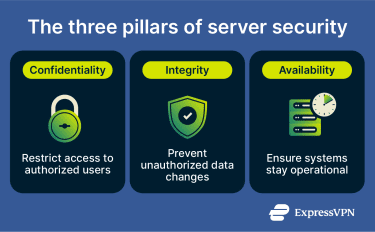
Typically, server security is based on three foundational principles:
- Confidentiality: Only authorized users should be able to access sensitive data. Breaches of this principle can be intentional (malicious attacks) or unintentional (human error), and specific implementations may include data encryption and access protocol policies.
- Integrity: Data should remain accurate and unaltered unless modified by an authorized user. Unreliable or manipulated data can lead to a loss of trust or reputational damage. Solutions for preserving data integrity include cryptographic hashes and digital signatures.
- Availability: Servers and the services and applications they support should be operational and accessible to authorized users when they need them. To reduce service disruption and downtime, organizations often rely on redundancy, disaster recovery planning, tested backups, and server load balancing.
How to evaluate your server security
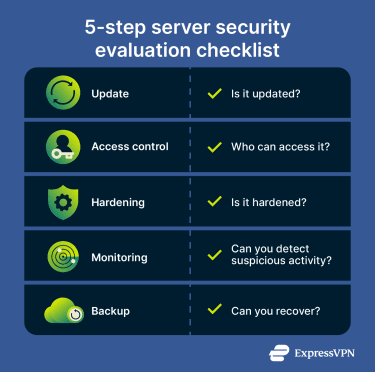
Evaluating server security involves several steps. Guidance from organizations like the Cybersecurity and Infrastructure Security Agency (CISA) and the National Institute of Standards and Technology (NIST) highlights several baseline questions administrators should be able to answer:
- Is it updated? The operating system and applications should be fully patched, and unsupported or end-of-life software should be removed. Many real-world attacks exploit known vulnerabilities for which fixes already exist.
- Who can access it? Broad administrative access increases risk. Multi-factor authentication (MFA) should guard admin access, and least-privilege principles should apply. Shared administrative accounts should be avoided, as these can reduce accountability and increase exposure.
- Is it hardened? Unnecessary services should be disabled, default credentials replaced with unique ones, the firewall enabled and restricted, and a secure configuration baseline applied.
- Can you detect suspicious activity? Logging should be enabled, and logs should be protected with alerts configured for suspicious behavior. The ability to identify threats ahead of time can help decision-makers take effective risk-management decisions.
- Can you recover? Backups should be stored separately from production systems and tested regularly to confirm they can be restored during an incident.
What are the dangers to server security?
Servers store sensitive information like operational and financial data. They also power critical applications and services. When servers aren’t properly secured or configured, attackers may exploit weaknesses to gain unauthorized access to data or disrupt operations.
DDoS and traffic floods
In distributed denial-of-service (DDoS) attacks, attackers overwhelm servers with large volumes of traffic, often through botnets. The goal is to exhaust system resources so legitimate users can’t use the network or services.
When traffic exceeds the server’s capacity, its response times slow down, potentially leading to timeouts where the user’s client can’t access the server. This can result in temporary service outages. Without rate limiting, traffic filtering, or DDoS mitigation measures in place, public-facing servers are particularly vulnerable to traffic floods.
Brute-force and credential attacks
Brute-force attacks occur when attackers attempt repeated login attempts using automated tools. These tools can test huge numbers of password combinations in an attempt to find the right one. Attackers typically target a restricted access point that provides admin access.
Credential stuffing attacks are similar but rely on leaked credentials (usernames and passwords) obtained from previous data breaches. If the server allows unlimited login attempts, attackers could gain unauthorized access by trying out the leaked credentials until they guess the right one.
Directory traversal attacks
Directory traversal is an application-layer vulnerability that can affect servers. This typically happens when a web application running on a server fails to properly validate user input, allowing access to unintended files on the server’s file system.
An attacker can exploit this vulnerability to access restricted files and folders and gain access to data that’s outside the application folder. They can do this by manipulating input parameters, especially if file permissions are overly broad or input validation is weak.
Injection attacks
Injection attacks happen when a server application processes untrusted input without properly validating or sanitizing it. An attacker can insert malicious commands into input fields, URLs, or API requests, which the server then executes as part of a query or command.
For example, in an SQL injection attack, malicious input is inserted into a database query. If the application doesn’t validate the input properly, the attacker may be able to read and tamper with data stored in the database.
As well as databases, injection vulnerabilities can affect operating system commands and other backend services.
Malware
Malware comes in many forms, including worms, Trojans, ransomware, and rootkits. Depending on the type, malware can compromise applications, enable further compromise of privileged accounts, exploit vulnerable plugins and outdated services, and expose services to other attacks.
Ransomware, in particular, encrypts data and demands payment for decryption. Without proper backups and network segmentation, recovery from a ransomware attack may be difficult.
Misconfigurations and exposed services
Many server attacks exploit configuration errors such as:
- Default credentials that were left unchanged.
- Unnecessary open internet-facing ports.
- Publicly exposed databases.
- Excessive permissions assigned to users or services that can be manipulated or exploited.
- Outdated software that’s missing the latest security patches.
These misconfigurations can involuntarily expose sensitive data or administrative interfaces publicly, and attackers can exploit them to gain access to internal systems.
Insider threats and privilege misuse
Server security can also be endangered by insider threats, like users with legitimate access who can unintentionally or deliberately misuse privileges. This can include:
- Accidental deletion of data.
- Unauthorized configuration changes.
- Copying sensitive information to an insecure medium.
- Bypassing established security procedures.
Types of servers and their security needs
Different server types require tailored security controls to address their specific exposure and operational roles.
Web server security
Web servers are publicly accessible and process HTTP requests. Because of this exposure, they’re frequent targets for application-layer attacks. Key risks include:
- Denial-of-service (DoS) attacks that overwhelm publicly accessible endpoints.
- Cross-site scripting (XSS) vulnerabilities that allow malicious scripts to execute in users’ browsers.
- SQL injection attacks that manipulate backend database queries.
- Directory traversal vulnerabilities that expose unintended server files.
- Unnecessary services or modules that expand the HTTP attack surface.
- Tightly coupled application and database layers, which can increase impact if the web layer is compromised.
Related infrastructure components (like proxy servers and DNS servers) may introduce additional exposure if misconfigured, particularly when they manage public traffic or resolve external requests.
Cloud server security
Cloud deployments introduce additional complexity compared to on-premise servers. While cloud providers can secure the infrastructure, customers still need to safeguard data, workloads, workflows, and access controls. Security incidents on cloud servers tend to be caused by configuration errors such as:
- Misconfigured storage buckets or databases that expose sensitive data publicly.
- Unsecured APIs that allow unauthorized access to workloads.
- Overly permissive identity and access management (IAM) roles that increase the impact of credential compromise.
- Limited visibility across multi-cloud or hybrid deployment, which can delay detection of misconfiguration or breaches.
Cloud environments can also be compromised through vulnerabilities in the underlying web server or application layer. If attackers exploit a weakness in a web server or application, they may gain an initial foothold and try to pivot into the broader cloud environment.
Also, cloud environments rely heavily on network services such as DNS, and misconfigured records or access controls can unintentionally expose internal services.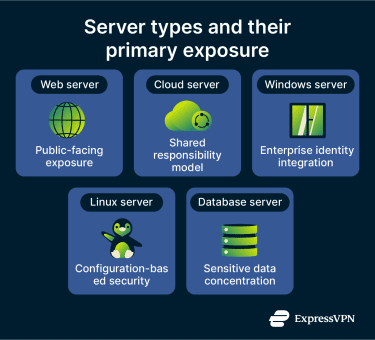
Windows server security
Windows servers are fairly common in enterprise environments, which makes them frequent targets for automated and credential-based attacks. Here’s what to watch out for in Windows servers:
- Exposed Remote Desktop Protocol (RDP) endpoints accessible from the internet.
- Misconfigured Active Directory privilege assignments, file-sharing services, or print services that expand the internal attack surface.
- Unpatched operating system vulnerabilities exploited by automated software.
- Privilege escalation through misconfigured Group Policy settings.
- Credential theft targeting domain-based authentication systems.
Linux server security
Linux servers are a large part of today’s web infrastructure. Companies use them in cloud environments and application hosting, and while Linux includes strong built-in security features, misconfigurations can still create exposure. Linux-specific risk considerations include:
- Weak or password-based Secure Shell (SSH) authentication that enables brute-force attacks.
- Direct root login access, which increases the impact of credential compromise.
- Outdated kernels or package dependencies containing known vulnerabilities.
- Improper firewall configurations that leave unnecessary ports exposed.
- End-of-life distributions that no longer receive security updates.
- Legacy services like the File Transfer Protocol (FTP) running without encryption or proper access controls.
Database and application server security
In many environments, databases on servers store authentication credentials, role definitions, or encryption keys, making them high-value targets. That’s why attackers often look for misconfigurations, excessive permissions, or application vulnerabilities. Common risks include:
- SQL injection and other application-layer attacks that manipulate database queries.
- Excessive query scope and unnecessary data exposure, increasing breach impact.
- Improper role separation, where developers or applications retain elevated privileges.
- Direct public exposure of database ports, bypassing application-layer controls.
- Insecure integration points, such as APIs or reporting tools that create indirect access paths.
Email servers that integrate with application environments also store sensitive communications and credentials, creating additional risk if access controls are weak.
Implementation of server security protocols
These practices apply across most server environments and form the baseline of personal and enterprise server security. Regardless of whether a server is cloud-hosted, web-facing, or running Linux, these controls help reduce exposure to common threats.
Firewall configuration and access rules
A properly configured firewall restricts inbound and outbound traffic to only what’s necessary for business operations. A default-deny approach (blocking all traffic unless explicitly allowed) can reduce unintended exposure.
IT teams can also limit administrative access to trusted IP ranges or secure gateways. Reviewing firewall rules periodically can help remove outdated entries, close unused ports, and eliminate legacy protocols that may introduce vulnerabilities.
Network segmentation
Separating servers into distinct network zones limits lateral movement if one system is compromised. Public-facing systems, internal application servers, and databases shouldn’t share unrestricted network access.
Segmenting environments (like isolating development from production systems) and explicitly defining and monitoring their access can also reduce the potential impact of data breaches.
Patch management and update strategy
Operating systems, applications, frameworks, and plugins should remain up-to-date with security patches at all times. Many real-world attacks exploit known vulnerabilities for which patches already exist.
However, while updates are critical for security, deploying them without testing can introduce compatibility or stability issues. A structured patch management process (which includes vulnerability monitoring and timely deployment) can significantly reduce exposure to known exploits.
Authentication and least privilege
To preserve accountability, IT teams should enforce MFA for administrative access and avoid using shared accounts. Applying the principle of least privilege also ensures that users and applications only have the permissions necessary for their roles.
Excessive administrative privileges can increase the impact of compromised credentials and insider misuse. Role-based access control and regular permission reviews can help maintain appropriate access boundaries over time.
Encryption for data in transit
Encrypting sensitive data moving between servers or cloud environments using protocols like HTTPS and Transport Layer Security (TLS) can prevent interception or tampering during communication. This is particularly useful in distributed or hybrid environments, where traffic often crosses multiple networks.
Encryption for data at rest
Data stored on servers or databases should also have encryption enabled to reduce exposure if unauthorized parties attempt to access storage volumes or physical systems. Proper key management (protecting encryption keys with strict access controls and separation) is also essential to maintaining the effectiveness of encryption protocols.
Secure backups and recovery
It can help to store backups separately from production systems and encrypt and test them regularly to confirm that urgent restoration is possible. Organizations should also document recovery procedures and validate them periodically. Otherwise, they may discover that the backups are corrupted or incomplete during a cybersecurity incident.
Monitoring, detection, and response
Preventive security measures reduce risk, but they can’t eliminate it. Servers should also be monitored for suspicious activities so issues can be detected, investigated, and contained before they escalate.
Intrusion detection systems
Intrusion detection systems (IDS) can monitor for signs of malicious activity. There are two main types that you can use as part of a server’s security:
- Network-based IDS (NIDS): NIDS analyzes network traffic and examines data packets for known malicious patterns or abnormal behaviors, and then alerts network admins to attacks like DoS, port scanning, or malware infections. NIDS can use signature-based detection, anomaly-based detection, or a combination of both.
- Host-based IDS (HIDS): Monitors activity directly on the server, such as unexpected processes, privilege escalation attempts, and file changes. Compared to NIDS, HIDS primarily protects individual hosts (like computers) instead of networking equipment. It analyzes authentication logs, system logs, and file integrity changes to detect abnormal behavior.
Centralized logging and alerting
Servers generate various types of logs and system events that are essential for early detection and alerting. However, reviewing them individually is inefficient and may delay investigations. Centralized logging allows organizations to detect patterns across environments, aggregate logs from multiple systems, and retain logs for investigations.
Alerts should prioritize essential aspects like unexpected permission changes and abnormal outbound connections. A security information and event management (SIEM) platform can aggregate logs, correlate events, automate alerting across systems, and improve your overall security posture.
Incident response basics
To effectively respond to and mitigate server threats, organizations need to craft an incident response plan, which includes:
- Defined roles and responsibilities.
- Tools for detection and containment.
- Procedures for system restoration and data recovery.
- Documentation and evidence preservation.
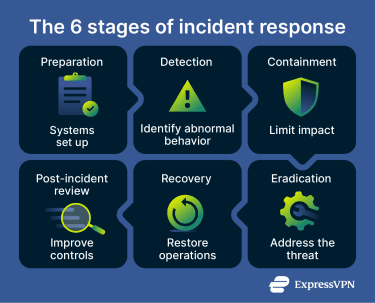 These phases are often formalized into 6 steps for a more elaborate incident response methodology:
- Preparation: Establishing policies, tools, and training.
- Detection: Identifying potential incidents.
- Containment: Limiting the scope of impact.
- Eradication: Removing the root cause of the incident.
- Recovery: Restoring normal operations.
- Post-incident review: Analyzing lessons learned and refining controls.
Post-incident hardening
Post-incident hardening focuses on analyzing how an incident occurred and strengthening controls to reduce the likelihood of recurrence. Cybersecurity teams can learn how to better identify and react to future attacks, which directly refines security procedures and improves defenses.
Auditing, compliance, and hardening standards
Server security hardening refers to strengthening configurations and controls to reduce the attack surface. Hardening extends beyond immediate threat prevention; it focuses on improving a system’s resilience against evolving risks.
Hardening also relates to security auditing and compliance requirements, such as adherence to regulations like the General Data Protection Regulation (GDPR) or the Health Insurance Portability and Insurance Act (HIPAA).
Newer regulations, like the EU’s Network and Information Security 2 (NIS2) directive or the Digital Operational Resilience Act (DORA) for financial institutions, require organizations to implement risk management and security controls, which often include system hardening practices.
Security audits and vulnerability assessments
Regular security audits can validate hardening practices and identify misconfigurations, policy gaps, or unmanaged services. They also help assess how effectively hardening standards are applied in day-to-day operations. Aside from compliance audits, there are several other types:
- Risk assessment: Evaluates the potential impact of vulnerabilities by reviewing existing protections, likely threat scenarios, operational risk levels, and critical assets. Companies can use the results to focus internal resources on improving their security frameworks effectively.
- Social engineering: Looks at attacks that manipulate the human factor, such as phishing emails, baiting, or pretexting. This can identify weak points in security awareness and improve employee reactions to security situations.
- Configuration: Reviews server and system configurations against security benchmarks to identify weaknesses before they can be exploited. These audits can inform organizations on how to best configure their systems for better security.
- External vulnerability assessment: Identifies vulnerabilities in public-facing systems and servers that might be exploited by attackers. This often involves simulating attack techniques to identify publicly exposed weaknesses. Organizations can then secure them before malicious actors find and use them.
- Penetration testing: Also known as pen testing, this involves active identification and controlled exploitation of vulnerabilities within an organization’s perimeter. Ethical or white hat hackers simulate attacks via methods like SQL injection to demonstrate how attackers may breach a system. This information can help organizations remedy security gaps.
CIS benchmarks and secure baselines
The Center for Internet Security (CIS) develops security standards based on the expertise of cybersecurity professionals from academic, government, and private environments. Their benchmarks provide configuration guidance that many organizations use as a security baseline.
Typically, CIS benchmarks involve two levels:
- Level 1: Basic security requirements that are designed to be broadly applicable and unlikely to disrupt normal operations.
- Level 2: Greater security requirements for organizations with a higher risk profile; may introduce operational constraints or require additional planning.
CIS benchmarks are often used in the process of security hardening, which helps protect organizations against cyberthreats and limits potential weaknesses in IT systems.
Server security checklist
To protect a server from internal and external threats, organizations often use a structured security checklist.
| Security feature | What it involves |
| Access control |
|
| Patch and update management |
|
| Network hardening |
|
| Encryption and secure communication |
|
| Logging and monitoring |
|
| Backup and recovery |
|
| Incident readiness |
|
Server security tools to consider
Organizations may use a range of server security software and platforms to strengthen protection, including:
- Extended detect and response (XDR): Aggregates telemetry from endpoints, networks, and servers to improve threat detection and response. XDR platforms aim to correlate activity across systems and automate parts of the detection and containment process.
- Network access control (NAC): Enforces policies governing which users and devices can connect to a network. NAC can validate device posture, such as patch status or security configuration, before granting access.
- Intrusion prevention systems (IPS): Inspect network traffic in real time and block malicious packets based on known signatures or behavioral patterns. IPS solutions may also generate alerts and logs for further investigation.
- Identity and access management (IAM): Manages user authentication and authorization, helping ensure that only approved users can access specific systems or data. IAM platforms typically support role-based access controls and MFA.
- Cloud Access Security Broker (CASB): Applies security policies to cloud applications and services, helping organizations monitor usage, enforce authentication requirements, detect anomalous behavior, and manage data access across cloud environments.
Challenges in implementing server security
IT teams might encounter several obstacles when implementing or hardening server security across the organization. These include:
- Complex IT environments: Hybrid and multi-cloud deployments increase visibility gaps and make consistent policy enforcement more difficult.
- Limited resources: Budget constraints and skill shortages can delay patching and security upgrades.
- Human error: Weak passwords, misconfigurations, excessive permissions, and insider threats remain common risk factors.
- Compliance pressure: Meeting regulatory requirements adds operational and documentation overhead.
- Evolving threat landscape: Attackers continuously adapt tactics, requiring ongoing monitoring, updates, and threat intelligence.
FAQ: Common questions about server security
What does server security mean?
How do I check server security?
What are the main layers of server security?
How can I secure my web server?
What firewall configuration is best for server security?
How often should I patch a server?
What is server hardening?
Take the first step to protect yourself online. Try ExpressVPN risk-free.
Get ExpressVPN
















 Support Center
  FAQ
FAQ  VPN Setup Tutorials