What does a compromised password mean? A simple guide to staying safe online


Passwords are still a common first line of defense for online accounts, but they're not a security guarantee on their own. A compromised password can give someone else the opportunity to access an account as if they were its owner. From there, they might be able to get their hands on the user’s personal information, financial accounts, work tools, and other linked services.
What does “compromised password” mean?
A compromised password is one that may no longer be secret, whether because it appeared in a known data breach, was stolen through malware or phishing, or was otherwise exposed to someone who shouldn't have it.
Why compromised passwords are serious
Once someone has a person's login details, they may be able to gain unauthorized access to accounts that hold personal, financial, or work-related information, or access to other services.
How attackers exploit compromised credentials
Once a username and password appear in a breach, attackers may run automated scripts that test the same credential pair across many popular sites, from email providers to banks to streaming services. This is called credential stuffing and is one of the most common techniques for taking over user accounts. It’s especially effective when the same password has been reused across multiple accounts.
Stolen credentials may also be bought and sold on underground forums. A single login pair might pass through several hands before anyone tries to use it. Some attackers focus on accounts that store payment information or have admin access. Others scrape personal details from inboxes to fuel more targeted phishing later, using real contacts and recent messages as bait.
What a compromised password can lead to
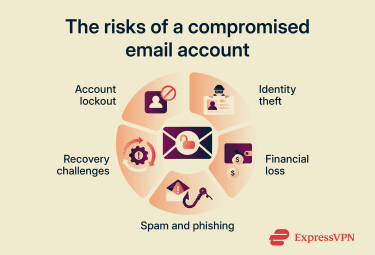
The fallout from a leaked password tends to scale with how the account is used. For a one-off forum login, the impact might be minor. For a primary email account, it can cascade quickly. Common outcomes include:
- Account takeover: The attacker logs in and locks the account owner out by changing the password and recovery options. If the account is an email account, they may also read sensitive messages, search for saved documents or codes, and use password reset links to access other accounts tied to that address.
- Identity theft: Personal details from the account are used to impersonate the account owner, for example, by using a name, address, date of birth, or ID number to apply for credit, file a fraudulent tax or benefits claim, or pass identity checks on another service.
- Financial loss: Unauthorized purchases, transfers, or fraudulent claims can follow. A shopping account with a saved card, a banking app, or a payment service can be used to buy goods, move money, redeem loyalty points, or redirect payouts.
- Spam and phishing sent to contacts: Messages sent from a hijacked account carry the trust of a real, recognized address. Friends, coworkers, or customers may be more likely to click a malicious link or respond to a fake request for money or information.
- Loss of access to other services: Many accounts rely on email-based password resets for recovery. If an attacker controls a primary email, they may be able to reset passwords for social media, cloud storage, shopping, and work tools before the account owner realizes what's happening.
When a compromised password becomes a bigger risk
Some leaked passwords carry more immediate risk than others. Treat a compromised password as urgent if any of the following apply:
- The same password was used on multiple accounts: Attackers routinely test leaked credential pairs across many sites. If the same password works elsewhere, a single breach can lead to several compromised accounts.
- The account doesn’t use multi-factor authentication (MFA): MFA adds a second check beyond the password, which makes a stolen password much less useful on its own. Where possible, use phishing-resistant options such as passkeys or hardware security keys.
- The account controls other logins: Email, Apple ID, Google, Microsoft, and social media accounts often act as recovery hubs for other services. If one of these is compromised, prioritize it before lower-value accounts.
- The password is old, weak, or predictable: A password that hasn’t been changed in years, is easy to guess, or follows a familiar pattern is more likely to appear on breach lists or in password-guessing attempts.
- The leak wasn't discovered right away: The longer a password sits exposed, the more time attackers have to test it, sell it, or combine it with other information.
How do passwords get compromised?
Passwords don’t only leak from big, high-profile breaches. Many exposures come from routine attack types that happen quietly and often. Knowing how each one works helps people spot warning signs earlier and choose better defenses. These are common cybersecurity threats, but they don’t all work the same way.
Data breaches
A data breach occurs when an attacker gains unauthorized access to a company's systems and copies data they were not supposed to access. In a password-related breach, the stolen data typically includes usernames, email addresses, and salted password hashes (cryptographic representations of passwords stored in place of plain text). In weaker cases, passwords may have been stored without hashing at all.
When stolen data becomes publicly accessible or circulates online, it's often described as a data leak. Leaks can follow a breach, but exposed data can also result from accidental disclosure, human error, or misconfigured systems.
Breaches at large organizations can expose hundreds of millions of records at once, and older breaches often continue to circulate for years.
Phishing attacks
Phishing tricks you into handing over your password directly. It often starts with an email, text message, phone call, social media message, or even a fake website that appears to come from a trusted source, such as a bank, delivery company, employer, or online service.
Many phishing attempts create a sense of urgency, warning that an account has been locked, a payment has failed, or immediate action is required. The goal is to pressure the recipient into clicking a link, downloading a file, sharing personal information, or entering login credentials on a fraudulent site.
Read more: What is social engineering? A complete security guide.
Poor password habits
Reusing the same password across multiple sites means a single breach can expose many accounts at once. Short or guessable passwords, predictable patterns like a word followed by a number, storing passwords in unprotected notes, and leaving saved passwords accessible on shared devices all create additional exposure.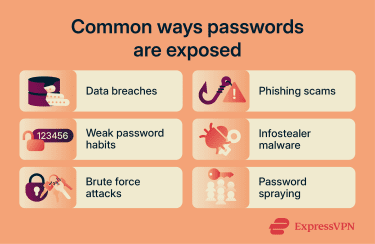
Infostealer malware
Infostealers silently collect saved passwords, browser cookies, autofill data, and session tokens from an infected device and send them to an attacker soon after infection. They often spread through cracked software, fake browser extensions, malicious downloads, or email attachments. Infostealer logs may later appear on criminal marketplaces, in leaked log collections, or in breach-monitoring datasets.
Brute force and password spraying
Brute force attacks involve repeated password guesses until one succeeds. In practice, attackers often try common words, predictable patterns, and previously leaked passwords before attempting more random combinations.
Password spraying takes the opposite approach: rather than trying many passwords against a single account, it tests a small set of common or weak passwords across many accounts. This can make the activity harder to spot, especially where weak or default passwords are still in use.
Also read: What is password cracking and how can you prevent it?
How to know if your password is compromised
Usually, people find out a password is compromised through an automatic alert, but the signs can also show up in account activity.
Breach alerts from browsers or password managers
When a browser, device, or password manager shows a warning such as "This password appeared in a data leak," it's checking saved passwords or saved logins against known breach data.
The National Institute of Standards and Technology (NIST) guidance says service providers should check new or changed passwords against blocklists that include commonly used, expected, or previously compromised values.
For example, Apple’s Detect Compromised Passwords feature can alert users when saved passwords appear in known data leaks. Google Password Manager, Chrome, and Firefox offer similar breach-alert or password-checkup features, though each service handles the checks differently.
ExpressVPN's ExpressKeys include Password Health and breach-checking features that can help identify weak, reused, or exposed credentials, including email addresses or passwords that may have appeared in known data breaches. For accounts not stored in a password manager, services like Have I Been Pwned (HIBP) let you search an email address against records from past breaches. If a match appears, check which service was affected, change any exposed passwords, and update any other accounts that reused the same or a similar password.
Suspicious account activity
Not every compromise comes with an alert. Sometimes the first sign is the account behaving strangely. Watch for:
- Emails sent from your account that you didn’t write.
- Password reset confirmations for services you didn’t request.
- New filters or forwarding rules you didn’t create.
- Charges, posts, messages, or files you don't recognize.
- Reports from friends or coworkers about spam from your account.
Any of these signs suggests someone else has been using the account. You might still be able to log in yourself, but the password should be treated as compromised, and the account should be secured immediately.
Login attempts from unknown devices or locations
Most major services log recent sign-in activity and let you review it. Check your account settings for a security or sign-in activity page. Red flags include:
- Successful logins from countries or cities you've never visited.
- Devices you don't recognize, such as unfamiliar browsers or phones.
- Failed login attempts clustered into short windows of time, which can indicate automated guessing.
- Active sessions from IP addresses far from your usual ones.
Note: Location and IP data can be imprecise, especially with virtual private networks (VPNs), mobile networks, or corporate networks, so unfamiliar activity should be reviewed in context rather than treated as automatic proof of compromise.
What to do if your password is compromised
Think of these steps as account protection basics after a leak: remove the exposed password, close old access points, and make the account harder to access. Acting quickly limits what an attacker can do.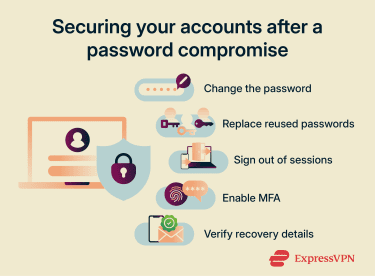
Change the exposed password immediately
Start with the account flagged as exposed. Open the service directly through its app or by typing the address into your browser, not through a link in an email. Go to account settings, find the password section, and pick a new password that's long, random, and not used anywhere else.
Also read: How to change your Google password.
Update similar passwords on other accounts
If you reused the exposed password elsewhere, or used a close variant such as adding a year or symbol to the same base word, those accounts need new passwords too. Make a list of accounts that share the same or similar password and work through them in order of sensitivity: email and banking first, then shopping and social media, then everything else.
Sign out of active sessions
Many services let you review active sessions from a screen labeled "Devices", "Sessions", or "Where you're signed in". Where the service allows it, force a sign-out on every device, including your own, then log back in with the new password. This can help break any session an attacker may have opened before you changed the password, since some services keep old sessions active after a password update.
For email and identity provider accounts, also review app passwords, connected apps, third-party access, and services that use “Sign in with Google,” “Sign in with Apple,” or similar login options. Revoke anything you don’t recognize or no longer use.
Enable multi-factor authentication
An attacker who only has the password will usually still need the second factor to sign in. Authenticator apps such as Google Authenticator, Authy, and Aegis Authenticator are more secure than SMS-based codes. SMS-based codes are still better than using only a password, but they're more vulnerable to risks such as SIM-swap attacks, in which an attacker takes over a phone number through the mobile carrier.
Check your recovery email and phone number
After regaining access, confirm that the recovery email and phone number are ones you control, that any backup codes have been regenerated, and that no unrecognized devices are listed as trusted. If any of these have been changed without your knowledge, treat the account as still at risk and contact the service's support team for a manual review.
How to prevent password compromise
Stopping every breach isn't possible from your end; companies you have accounts with can still be attacked. But good password habits limit the damage a single exposed password can do.
Use strong and unique passwords
Aim for a password at least 16 characters long, or longer if the service allows it. A long, unique passphrase made up of several unrelated words can also be a strong and memorable choice.
Read more: Password entropy explained: How to create stronger, safer passwords.
Store passwords in a password manager
Keeping a separate strong password for every account is only realistic with a password manager. A reputable password manager can generate random passwords, store them in an encrypted vault, fill them in automatically, and sync them across devices.
Avoid saving passwords on shared devices
Saving passwords in browsers on shared, public, or unmanaged work-owned devices can be risky, as someone else may be able to access the browser profile or device.
Also read: How to delete saved passwords across all browsers.
Monitor accounts for future breaches
New breaches are reported regularly. ID Alerts, available to eligible ExpressVPN Advanced and Express Pro users in the U.S., monitor for signs that personal details such as email addresses, phone numbers, and other identity information appear in data breaches, on the dark web, or in other monitored sources. It sends alerts with details about what was found and recommended next steps.
FAQ
Is a compromised password the same as a hacked account?
Can a password manager detect compromised passwords?
Is multi-factor authentication enough after a password leak?
How often should I check for exposed passwords?
What is the difference between a weak password and a compromised password?