Is Brave browser safe? Everything you need to know about its privacy and security


Brave positions itself as a privacy-focused browser, but does that mean it’s any safer than more popular options like Chrome and Firefox?
In this overview, we’ll analyze how Brave handles tracking protection and ad blocking, along with its various built-in features such as Brave Wallet and Brave Leo. We’ll cover how these features differ from what other browsers provide and address concerns about Brave’s data collection practices and transparency.
By the end, you should clearly understand Brave’s strengths and limitations so you can decide whether it fits your security and privacy needs.
What is the Brave browser?
Brave is a free web browser that automatically blocks many ads and trackers, limiting how much information websites can collect about your browsing habits. It was intended to offer a safer browsing experience right out of the box, without the need for add-ons or technical expertise.
Who created Brave?
Brave was created by Brendan Eich and Brian Bondy in 2015. Eich, the Chief Executive Officer (CEO) of Brave, is best known for creating JavaScript and co-founding Mozilla, the company behind the Firefox browser. Bondy, the company’s Chief Technology Officer (CTO), previously worked at Mozilla and Khan Academy.
Is Brave a safe browser?
Brave offers a lot of features that help secure your online activity and improve privacy.Many of its protections are built directly into the browser through Brave Shields, a system that reduces exposure to ads, trackers, and other common web-based threats by default. However, there are some data collection considerations to think about. First, let’s look at the privacy and security features it offers:
Built-in ad and tracker blocking
 Brave Shields blocks ads and trackers before they load. It checks each script against built-in filter lists and blocks anything known to track browsing activity.
There are two available Brave Shields modes; Standard and Aggressive. The former is Brave’s default level of protection that primarily focuses on third-party ads and trackers, while the latter expands to first-party trackers. Aggressive mode runs the risk of breaking some sites.Brave also employs Canonical Name (CNAME) uncloaking, which prevents third-party trackers from being able to hide their code in an attempt to circumvent blockers.
It uses resource replacement as well, which replaces certain third-party scripts with stripped-down versions that preserve privacy. This helps pages continue to function while preventing the original scripts from tracking users.
Ephemeral storage
Brave prevents your browsing data, such as the information tied to cookies, from being stored long-term in third-party storage. Unlike typical browsers, Brave uses a temporary, ephemeral solution that allows limited third-party storage and clears it when a site or browsing session ends. This helps prevent long-term tracking without running the risk of breaking site features or functions.
HTTPS Everywhere integration
Based on the HTTPS Everywhere project, Brave offers “HTTPS by Default.” When a site supports HTTPS, Brave will always upgrade to it whenever possible.
HTTPS sites are much safer than HTTP ones because they use a protocol called Transport Layer Security (TLS) to encrypt the information you send and receive, preventing outsiders from reading or modifying it.
Open-source architecture
Brave is open source, meaning its source code is publicly available for anyone to inspect, review, and test. This allows security researchers and independent experts to examine how the browser works and report issues if they find vulnerabilities, which increases transparency and trust.
For Windows and most other platforms, Brave is built off the open-source Chromium Web Core, the same engine that powers Microsoft Edge and Google Chrome. BecauseChromium is widely used, it’s regularly scrutinized by a large community of developers and security researchers.
On Apple devices, Brave uses WebKit, the browser engine required for all iOS browsers. WebKit is also open source and subject to public review.
Fingerprinting protection
Some websites use fingerprinting to identify visitors based on small details about their devices. These details often include:
- Screen resolution
- Installed fonts
- Time zone and language settings
- Browser configuration and system details
- IP address
- Whether cookies are enabled
When combined, these signals create a unique profile (or fingerprint), allowing users to be tracked without the need for cookies. Brave reduces this risk by taking several steps to make your device appear more generic to websites. For example, it slightly randomizes certain browser APIs that are commonly used for fingerprinting, helping prevent sites from building a stable, unique identifier while preserving site functionality. Brave also reduces language- and font-based fingerprinting.
Malware and phishing protection
Brave uses Google Safe Browsing (and on iOS, Tencent Safe Browsing as well) to warn you before you access a dangerous site. The browser states these warnings arrive when websites show evidence of malicious intent, phishing or malware. Here are some examples of threats the browser could warn against:
- Phishing example: A fake banking login page that copies the design of a real site to steal your account credentials.
- Malware example: A download page that pushes a fake “browser update” that instead installs ransomware or spyware.
Private browsing modes
Brave offers two types of private browsing. The standard Private Window functions like similar modes in other browsers, where your local browsing history, cookies, and cached files are automatically cleared once you close the window. This reduces online activity information stored on the device, although internet providers and websites can still see your activities.
The second option is a Private Window with Tor. Tor stands for The Onion Router, a system that routes traffic through several servers to hide your real IP address.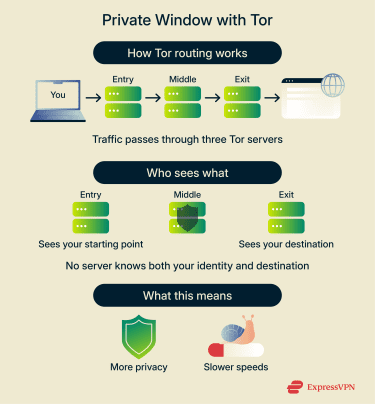
When you open a Private Window with Tor, Brave doesn’t connect to websites directly. Your connection first passes through three separate servers in the Tor network before reaching the site. In this chain, one server knows your starting point and another knows your destination, but they never share that information because a third computer sits between them. This makes it much harder for websites to link your activity to your real IP address.
The downside with this mode is it’s noticeably slower than regular browsing, as your connection has to be bounced around multiple additional servers before it can reach its destination.
Is Brave’s Private Window safer than Chrome’s incognito mode?
Chrome’s Incognito mode clears local data but offers limited tracker blocking and still shares your real IP address with the websites you visit. Brave, on the other hand, blocks many trackers by default, both inside and outside Private Windows. Plus, you can choose to hide your real IP if you use a Private Window with Tor.
Data privacy and user tracking
Brave focuses on collecting as little data as possible. The browser doesn’t build profiles or sell usage data, and it avoids techniques that rely on tracking people over time. That said, Brave still collects a limited amount of data to maintain functionality and improve features.
What data does Brave collect?
Brave can collect diagnostic information if the user decides to send a crash report. These reports include technical information about your device and the event that caused the problem, which cannot be used to identify you. Brave also tracks usage of its automatic security updates for internal statistics, but all data is aggregated (grouped with other users) and can’t be linked to you.
Brave also gathers aggregated first-party data such as what features are active, the number of tabs that are open, and how many extensions are installed. These metrics are anonymized and used to detect problems and improve functionality without identifying individual users.
That covers what Brave collects as part of its browser functionality. Below, we’ll describe the different built-in features it offers that may involve additional data processing when enabled, including cases where data is shared with third parties.
Brave Wallet
Brave offers a built-in crypto wallet. It states that it doesn’t track or log your wallet actions, and that it proxies some wallet interactions with third-party services to strip your IP address when possible. Additionally, Brave uses anonymous and aggregated statistics about transactions from its on-ramp (converting traditional currency to crypto) partners.
Note that when you use on-ramps or off-ramps (services that convert crypto into traditional currency), it will require a third party. These parties will see your IP address and will likely conduct identity checks (ask to see an ID or passport) to comply with legal obligations.
BAT and Brave Rewards
Brave Rewards is tied to an optional ads system that rewards users with Basic Attention Token (BAT), a cryptocurrency. It requires your country to be tied to a unique Rewards Payment ID. If you choose to associate this with a custodial account, information such as your Custodian ID and deposit addresses will be shared and stored for the duration of your Brave account and then retained only as required to meet applicable legal, regulatory, and tax obligations.
Brave states it doesn’t receive or retain your actual Know Your Customer (KYC) identity documents; that’s handled entirely by the third party.
To deliver ads and distribute BAT rewards without centralized tracking, Brave uses an on-device ad matching system. The ads are chosen based on your browsing history, but all data related to your browsing activities is stored on your device and inaccessible to Brave. It collects broad statistical data to determine things like how many ads it should show, but this can be done without capturing identifying information. It’s also worth noting that Brave doesn’t know what particular ads you’ve seen or interacted with.
Brave Talk
This is the browser’s private video (or audio-only) conferencing service. Brave states that voice, video, and text communications are not logged or saved long-term, and that who you talk to and the details surrounding such communication is private to you.
However, data like your IP address and the URL of the meeting during a call are processed to facilitate the service. Do note that temporary text chat caches do exist during active conversations, and Brave stores call recordings for 24 hours to allow you the option of downloading them.
Communications are encrypted between the browser and the Brave Talk service by default through TLS. However, this means that the call is decrypted and possibly accessible by Brave on their servers. To encrypt them on the server, each call participant must enable Video Bridge Encryption (VBE). Keep in mind that this is a feature Brave describes as experimental and you cannot record or livestream the call while it’s in use.
The Brave Talk premium plan requires an email address and payments must be provided through Stripe; Brave says it has no access to any of Stripe’s data.
Brave Leo
Brave Leo is Brave’s AI assistant. According to the privacy policy, Brave doesn’t collect any identifiers through this service, including IP addresses or conversation transcripts, nor does it use your chats for model training. Enabling chat history storage ensures conversations are stored and encrypted locally on your device.
Brave may cache large prompts briefly for performance reasons, but they are deleted within minutes. Its premium subscription validation uses unlinkable tokens, meaning that usage of Leo Premium cannot be connected to your purchase details.
You can choose to submit feedback on Leo to Brave. This will send them the rating, the language, your full conversation, the AI model and version, and your premium subscription status, along with any additional information you choose to include.
Brave News
Brave News is an ad-supported news feed aggregator and content reader that’s disabled by default. News content is delivered in ways that avoid unique identifiers being transmitted to Brave or any third party, for example, headlines are served from a public content delivery network (CDN) as uniform text files for everyone in a region.
Images and other content may be proxied through encrypted channels that strip IP addresses before delivery, and manually added RSS feeds are fetched directly from publishers without Brave’s servers seeing your choice. In addition, your RSS feed selections and follow/unfollow actions never leave your device and aren’t logged.
Web Discovery Project (WDP)
WDP is Brave’s opt-in system for contributing anonymous browsing data. It’s meant to help improve Brave Search. Brave states that no personally identifiable information is collected or transmitted. All data is processed locally on your device, where Brave strips identifiers, removes sensitive information, and bundles contributions into aggregated, unlinkable submissions before sending them.
However, WDP gathers a small portion of visited URLs and search queries. Search queries are only recorded if they pass a series of checks that deem them to be non-sensitive.
Safe Browsing
Brave uses Google Safe Browsing (also Tencent Safe Browsing on iOS) to warn you about unsafe sites and malicious downloads. Hashed partial URL data is sent to the Safe Browsing provider when you visit a potentially unsafe site. The relevant website address is never shared with the provider.
On desktop, Brave proxies these checks so your IP address isn’t visible to Google. On mobile platforms, however, Safe Browsing may expose your IP to the provider (Google for Android and Apple for iOS devices). Note that for iOS, your IP address won’t be exposed to Tencent unless you have mainland China or Hong Kong set as your region on Safari.
How Brave handles sync, storage, and permissions
Brave Sync lets users share bookmarks, passwords, and other data. To do this, Brave encrypts and stores the data on a cloud storage service. It states that only you will have the decryption key and neither Brave nor the storage service provider can access the data.
Brave’s storage settings allow users to control how cookies and site data are handled. Permissions such as location access, camera use, and notifications follow an “ask first” approach where the browser requests approval before allowing a site to use them.
What are the risks or downsides with Brave?
Some of Brave’s features come with trade-offs that can affect everyday browsing. The company faced criticism over certain past security and business practices.
Site compatibility issues
Brave’s default blocks can affect how some websites function. Some pages rely on tracking scripts to load certain site elements. When Brave blocks these trackers, parts of a site may not display correctly or work as intended. Adjusting the Shields settings on a site-by-site basis can often resolve the issue, though it adds an extra step for users.
Controversies
There were reports of Brave using affiliate links in 2020 to generate revenue. Brandon Eich apologized after users complained that direct navigations to Binance, Ledger, Trezor, and Coinbase would automatically redirect them to the affiliate version of the relevant URLs, which Brave got paid for. Afterwards, Eich stated that the company will no longer redirect traffic.
Additionally, reports from 2021 revealed that due to a bug, Brave was sending requests for .onion sites through regular Domain Name System (DNS) resolvers instead of private Tor nodes. This meant that searches for .onion sites, which people expected to be private, could actually be seen by internet service providers (ISPs). While the issue was patched, it raised concerns about the company’s security practices.
Do you need extra protection when using Brave?
While Brave offers plenty of security and privacy features, it cannot protect you against all threats online. For increased protection online, you should pair it with other privacy and security apps and tools.
Should you use a VPN with Brave?
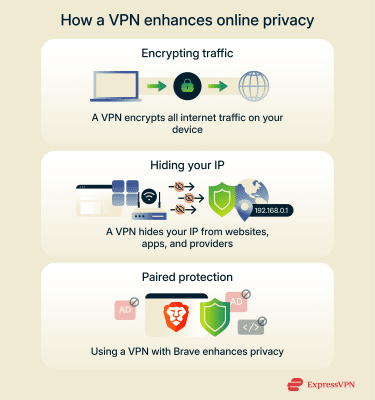 A virtual private network (VPN) like ExpressVPN adds an extra layer of protection by encrypting all internet traffic on your device. This includes apps like email clients, games, banking apps, and streaming services, which fall outside the scope of Brave’s browser protections. This encryption also ensures you’re protected from man-in-the-middle attacks (MITM) while browsing on public Wi-Fi.
A VPN also hides your IP address from websites and apps by routing your traffic through a secure server. When paired with Brave, this can further reduce the chances of your real IP address being exposed through certain browser features or third-party connections. While Brave’s Private Window with Tor also allows you to hide your real IP, VPNs typically route traffic through a single server rather than multiple relays, resulting in faster performance.
Should you use antivirus or firewall tools with Brave?
Brave shouldn’t replace antivirus or firewall software as it doesn’t function as either. While Brave can warn you of malicious sites and block some browser-based threats, it cannot detect or remove malware from your device the way an antivirus can. Similarly, the Brave browser itself offers no functionality similar to a firewall, and as such is unable to block malicious traffic from affecting your device. To protect against such threats, Brave users should consider using antivirus tools and a firewall.
Please note: Brave does offer a paid Brave Firewall + VPN service, which provides device-level traffic encryption and firewall functionality, but it’s separate from the browser itself.
FAQ: Common questions about Brave browser safety
Is Brave really safer than Chrome?
Brave generally provides stronger privacy protections than Chrome. It blocks many trackers, ads, and fingerprinting techniques by default. Chrome, in contrast, typically requires users to install extensions to achieve a similar level of privacy protection. Brave also offers private browsing with Tor, which can hide your IP address and make it harder to link your browsing activity to your real identity.
Is Brave a good browser for privacy?
Brave includes a range of privacy-focused features. Its default settings block many ads and trackers and reduce the amount of browsing data that can be collected by websites. The browser is also designed to avoid building profiles on users and includes features like fingerprinting protection and HTTPS by Default.
Is Brave safe for online banking?
Brave includes several security features that can support safer online banking, such as blocking many trackers, enforcing secure HTTPS connections, and warning about phishing sites. However, no browser can provide full protection against all threats.
Does Brave sell your data?
According to Brave’s privacy policy, the company states that it doesn’t sell user data to advertisers.
How can I optimize the privacy settings in Brave?
You can adjust several built-in options to increase privacy controls. These include setting Brave Shields to “Aggressive” and using Private Windows with Tor, which can hide your IP address from websites. You can also manage permissions for location, camera, and microphone access on a site-by-site basis.
Is Brave better than using Chrome with extensions?
Brave and Chrome with extensions take different approaches to privacy. Brave has many privacy tools by default, such as built-in ad and tracker blockers and fingerprinting protection, while Chrome typically relies on user-installed extensions for similar functionality. Using built-in features can reduce the need to manage multiple extensions, which may vary in quality and maintenance.
Can Brave completely replace Chrome or Firefox?
It depends on the sites you commonly visit, as some Brave users may encounter minor compatibility issues on sites that run trackers or scripts. People who rely on very specific extensions or enterprise tools may need to test compatibility before fully switching.
When should I consider other browsers instead of Brave?
Other browsers may be preferable in specific situations, such as if you require extensions and enterprise tools that aren’t fully supported in Brave. If you’re commonly running into site issues due to Brave’s tracker blocking, you may also wish to consider another browser.
Take the first step to protect yourself online. Try ExpressVPN risk-free.
Get ExpressVPN