What is bandwidth throttling and how do you stop it?


If you’ve noticed your internet slowing down at random times and then returning to normal, it may be a sign of bandwidth throttling. This can happen for several reasons, and there are a few practical steps that might help reduce its impact.
This article explains what bandwidth throttling is, why it occurs, how to spot it, and the options for dealing with it.
What is bandwidth throttling?
Bandwidth throttling, also called internet throttling, internet service provider (ISP) throttling, or traffic shaping, refers to a situation where an ISP may reduce connection speed as part of its traffic management practices. This may occur when certain activities use large amounts of bandwidth, such as high-definition streaming or torrenting, and may occur even on unlimited data plans.
However, slower speeds are not always caused by throttling. Performance issues can also be due to limits set by local network administrators, restrictions on public Wi-Fi, congestion on a website or service, background apps consuming bandwidth, or router settings that manage bandwidth.
When throttling is applied, your connection remains active, but data may be delivered more slowly as part of the provider’s traffic-management approach.
How bandwidth throttling works
Traffic management across networks is generally done using a combination of routing equipment, policy controls, or Quality of Service (QoS) mechanisms used to regulate data flow and maintain network performance. These systems can set speed limits or adjust how certain types of traffic are handled, depending on the provider’s network-management practices.
Some ISPs may, in certain network configurations, also use techniques such as deep packet inspection (DPI) to classify traffic into general categories, such as video streams or peer-to-peer (P2P) connections, based on metadata or behavior. When this type of classification is used, specific categories of traffic may, in some cases, experience reduced speeds as part of broader congestion management or traffic-flow policies.
Common types of throttling include:
- User-based: Triggered after hitting a data cap or fair-use threshold.
- Protocol-based: Targeting specific protocols like BitTorrent or Voice over Internet Protocol (VoIP), while leaving the rest unaffected.
- Activity-based: ISPs may, in some instances, restrict bandwidth for specific types of traffic. This can also be described as content-based throttling, in which the slowdown targets particular types of content, such as video.
- Time-based: For example, your ISP might apply this during peak usage hours to manage network congestion.
- Congestion-based: Slowdowns that occur when a network segment is overloaded, and speeds drop temporarily due to traffic-management policies.
- Device-based throttling: An ISP may apply speed limits for specific devices or tethered connections on your line, while other devices on the same account may still get full speed.
- Location-based throttling: Slowing speeds in specific areas or cell towers, often reflecting regional capacity limits or recurring high demand.
Some ISPs may also use traffic-shaping algorithms such as token bucket or leaky bucket to regulate throughput and smooth traffic bursts. These mechanisms are used as part of traffic management and can result in variable speeds depending on network conditions and provider practices.
Why do ISPs throttle your bandwidth?
ISPs may slow certain types of traffic for a range of technical, policy, or business reasons, which generally fall into the following categories: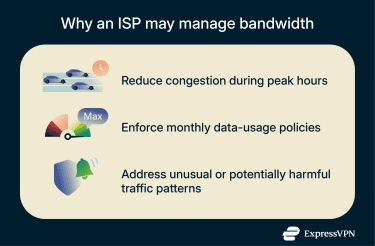
Network congestion management
When many subscribers share limited infrastructure, high-bandwidth activities such as streaming, gaming, or large downloads can strain a provider’s data capacity, which may lead to slower speeds.
Some ISPs may temporarily reduce speeds for certain activities during peak periods as part of congestion-management practices.
Data usage caps and fair use
Certain "unlimited" plans include fair usage policies. Once you exceed a certain threshold, your speeds may be reduced until the next billing cycle or plan change. Providers often state that these policies help manage overall demand.
Preventing network abuse
ISPs may also reduce speeds when traffic patterns trigger automated security systems, thereby affecting performance. In some cases, limiting traffic that deviates from typical usage patterns can minimize strain on network resources and improve how services run for other users.
Is bandwidth throttling legal?
The legality of throttling depends on the country's regulatory framework. Many countries don’t have explicit net-neutrality rules, and enforcement may vary even where policies exist.
In the U.S., the Federal Communications Commission (FCC) adopted an order to restore net-neutrality protections in April 2024, but the United States Court of Appeals overturned this decision in January 2025, ruling the FCC lacks statutory authority to impose net-neutrality rules under the Communications Act. As a result, there is currently no federal net-neutrality mandate that universally prohibits ISPs from throttling in the U.S.
Several states, including California, continue to uphold their own net-neutrality laws that require providers to avoid discriminatory traffic management practices. In states without such protections, ISPs may have greater flexibility in managing network traffic.
In Europe, EU Regulation 2015/2120 requires ISPs to treat traffic categories consistently. Traffic management is permitted under specific circumstances, such as temporary congestion, security measures, or compliance with legal obligations. Users must still be able to access online services without unjustified slowdowns.
How to tell if your internet is being throttled
Before concluding on throttling, rule out other causes of slow internet. Weak Wi-Fi signals, outdated routers, background downloads, cloud sync activity, overloaded servers, device limitations, and congested websites can all affect your connection. Even high latency or heavy memory usage on your device may appear to be throttling.
However, if one application consistently runs slowly while others perform normally, this may indicate throttling. You can follow the steps below to help you detect throttling: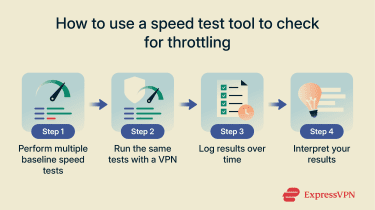
Step 1: Use a speed test tool
Start by running a speed test using a reliable free tool like Ookla. Compare the result to the speeds advertised in your plan. A significant difference may indicate throttling, but it could also point to peak-hour congestion or network issues.
For accurate results, run multiple tests on both wired and Wi-Fi connections at different times of the day. If speeds are only slow at certain times (even when you’re alone on the network), this may indicate congestion or other time-specific network conditions, including possible throttling.
Step 2: Compare with VPN speed
Next, test your connection while using a reputable virtual private network (VPN). A VPN encrypts your traffic, hiding its content from the ISP. If speeds are noticeably faster over the VPN, this could suggest that certain traffic types may have been handled or routed differently on your standard connection.
However, if speeds remain equally slow with or without the VPN, the slowdown is likely due to data caps, general congestion, or equipment issues.
Step 3: Monitor patterns of slowdown
Track when slowdowns occur, which activities are affected, and whether the issue appears at predictable usage thresholds or times.
For example, if YouTube constantly buffers after 10–15 minutes while everything else stays fast, it may suggest app-specific issues, routing differences, or, in some cases, throttling of that traffic category. If speeds drop only when multiple household members are connected, your connection might simply be hitting its limit.
Slowdowns that appear after you’ve used a certain amount of data could point to a data cap, while issues that show up only during evening “prime time” may relate to peak-hour network policies.
Keeping a simple log of your tests and general usage can help you spot patterns over time. If you choose to reach out to your ISP, these documented notes can help you explain what you’re experiencing.
How to stop bandwidth throttling
While no solution is foolproof, specific strategies may help reduce slowdowns or improve performance.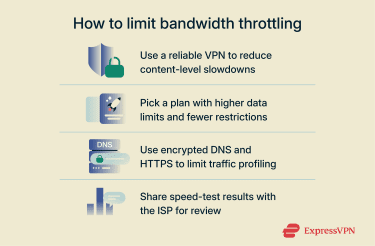
Use a reputable VPN
With a VPN, your online activity is encrypted, preventing anyone, including your ISP, from viewing the details of your traffic. This may help reduce the likelihood of content-based throttling because the provider may have less visibility into specific services or traffic types.
VPN encryption introduces some overhead, so choosing a service with fast servers and modern protocols can help avoid reduced speeds. For example, ExpressVPN uses its performance-optimized Lightway protocol to minimize delays.
A reputable VPN should also have a clear privacy policy, broad device compatibility, and features like a kill switch and IP/Domain Name System (DNS) leak protection to prevent accidental exposure of traffic.
Change your data plan or provider
If you frequently hit your plan’s data cap or notice recurring slowdowns, upgrading to a plan that matches your usage can help reduce these issues. Higher-tier options often come with larger or no caps, which can reduce the frequency of speed drops.
It’s also worth checking what other providers in your area offer. Some ISPs offer higher data caps or fewer restrictions, and switching to fiber or business-grade service may deliver more consistent speeds and fewer restrictions.
Use an encrypted Domain Name System (DNS) and HTTPS
DNS over HTTPS (DoH) and DNS over TLS (DoT) encrypt your DNS requests, preventing ISPs from viewing the domain names resolved by DNS. When paired with HTTPS, this reduces domain-level visibility, although ISPs may still infer destinations from IP addresses or other metadata. As a result, encrypted DNS can limit certain types of monitoring, but it does not reliably prevent throttling.
Encrypted DNS services are generally easy to set up on individual devices or routers. Used in conjunction with a VPN, they can enhance privacy by reducing visibility of DNS queries.
Contact your ISP with proof
If you suspect unlawful throttling, particularly in regions with net-neutrality protections, record the issue and contact your ISP to clarify your doubts. Provide speed logs, streaming test results, or other relevant data, and request clarification on any traffic-management practices or data caps that may apply to your account.
If the issue continues, you can escalate by filing a complaint with the relevant regulatory authority or consider switching to another provider.
Best VPN practices to avoid content-based throttling
Choosing the right VPN and using it correctly may help with content-based bandwidth throttling, such as slowdowns targeted at specific apps or services. Here are a few practices to keep in mind.
Use obfuscated servers
Some ISPs and restrictive networks may use DPI techniques to classify traffic types, which in some cases can influence how those traffic categories are managed. Obfuscated VPN servers make encrypted traffic harder to classify, which may reduce slowdowns linked to traffic identification.
Because obfuscation requires extra processing and additional protocol steps to disguise VPN traffic as regular HTTPS or another protocol, it adds overhead, which may affect speeds. However, overhead is usually modest, and modern, optimized protocols (e.g., Lightway, WireGuard-based obfuscation systems) help reduce the performance impact.
Consider the limitations of free VPNs
Free VPNs can be a convenient entry point for anyone exploring online privacy tools, but it’s helpful to be aware of a few common constraints that come with many free plans. Some offer a limited number of servers, may deliver slower speeds during busy periods, or rely on ads.
Some free services also include strict daily or monthly data caps. Such limits are easy to exceed during streaming or data-heavy activities, which can make some free VPNs less suitable for long-term use, even if they may help with content-based throttling in some instances.
FAQ: Common questions about bandwidth throttling
Does throttling affect streaming quality?
Throttling can affect streaming quality if it reduces the available bandwidth for video playback. This may result in lower resolution or increased buffering, depending on the degree of slowdown and the streaming service’s adaptive bitrate settings.
Can mobile networks throttle your data?
Yes. Mobile networks may adjust speeds under certain conditions, such as after reaching a data cap, when using hotspot features, or during periods of heavy demand. Some plans also manage video traffic differently by default (for example, optimizing it to standard-definition levels). Policies vary by carrier and plan type.
Is throttling the same as slow internet or data capping?
Not necessarily. Slow internet can result from weak Wi-Fi signals, outdated hardware, or network congestion. Data capping limits the amount of data you can use within a billing cycle. Throttling refers to speed reductions that may be applied after specific thresholds or under certain traffic-management policies.
Can internet service providers (ISPs) throttle VPN traffic?
Some networks use traffic classification techniques, such as deep packet inspection (DPI), to identify and manage VPN connections. In some cases, this may result in reduced VPN traffic speeds. A VPN that supports obfuscation may make encrypted traffic harder to classify.
How can I tell the difference between throttling and a poor Wi-Fi signal?
If speeds improve when you switch to a wired Ethernet connection or move closer to the router, it’s likely a Wi-Fi-related issue. Potential throttling usually affects all devices on the connection and may appear at predictable times or after specific usage patterns.
Do all ISPs throttle bandwidth?
Not all internet service providers (ISPs) use throttling. Some may implement traffic management measures during congestion, while others have plan-specific policies that adjust speeds in certain situations.
Take the first step to protect yourself online. Try ExpressVPN risk-free.
Get ExpressVPN